
To get details of a call (including Status, Price, etc.), you will need to make a HTTP GET request to
https://<your_api_key>:<your_api_token><subdomain>/v1/Accounts/<your_sid>/Calls/<CallSid>
Where <CallSid> is an alpha-numeric unique identifier generated for all the calls made via Exotel.
If you’d prefer response in JSON format, just append .json at the end of the HTTP GET request.
<your_api_key> and <your_api_token> with the API key and token created by you.<your_sid> with your “Account sid”<subdomain> with the region of your account<your_api_key> , <your_api_token> and <your_sid> are available in the API settings page of your Exotel Dashboard
In the case of an outbound call originated via the API, the Sid parameter is as returned in the XML/JSON response to your request. In the case of inbound calls, you can get the Sid by using the Passthru applet.
The below query parameter in GET Call Details allows per-request control over the TTL (Time-To-Live) of the PreSignedRecordingUrl. It accepts values between 5 to 60 minutes, overriding the account-level setting for more granular access control.
| Parameter Name | Mandatory / Optional | Value |
| RecordingUrlValidity | Optional | An Integer equal to or between 5 and 60. Note- If the value is greater than 60 or less than 5 then it will return a 4XX Error. |
If you would like to use the pre-signed URL via this API, please contact hello@exotel.in
curl https://<your_api_key>:<your_api_token><subdomain>/v1/Accounts/<your_sid>/Calls/b6cfaf5f5cef3ca0fc937749ef960e25
var request = require('request');

var options = {
    url: 'https://<your_api_key>:<your_api_token><subdomain>/v1/Accounts/<your_sid>/Calls/b6cfaf5f5cef3ca0fc937749ef960e25'
};

function callback(error, response, body) {
    if (!error && response.statusCode == 200) {
        console.log(body);
    }
}

request(options, callback);
<?php
include('vendor/rmccue/requests/library/Requests.php');
Requests::register_autoloader();
$headers = array();
$response = Requests::get('https://<your_api_key>:<your_api_token><subdomain>/v1/Accounts/<your_sid>/Calls/b6cfaf5f5cef3ca0fc937749ef960e25', $headers);
import requests

requests.get('https://<your_api_key>:<your_api_token><subdomain>/v1/Accounts/<your_sid>/Calls/b6cfaf5f5cef3ca0fc937749ef960e25')
require 'net/http'
require 'uri'

uri = URI.parse("https://<your_api_key>:<your_api_token><subdomain>/v1/Accounts/<your_sid>/Calls/b6cfaf5f5cef3ca0fc937749ef960e25")
response = Net::HTTP.get_response(uri)

# response.code
# response.body
HTTP Response:
"<?xml version=""1.0"" encoding=""UTF-8""?>
<TwilioResponse>
    <Call>
        <Sid>b031d3709c9a35b3d318abecb5b419b6</Sid>
        <ParentCallSid/>
        <DateCreated>2025-11-06 02:24:57</DateCreated>
        <DateUpdated>2025-11-06 02:25:50</DateUpdated>
        <AccountSid>Exotel</AccountSid>
        <To>09567732454</To>
        <From>08074588403</From>
        <PhoneNumberSid>07941056504</PhoneNumberSid>
        <Status>completed</Status>
        <StartTime>2025-11-06 02:24:57</StartTime>
        <EndTime>2025-11-06 02:25:49</EndTime>
        <Duration/>
        <Price/>
        <Direction>outbound-api</Direction>
        <AnsweredBy/>
        <ForwardedFrom/>
        <CallerName/>
        <Uri>/v1/Accounts/Exotel/Calls/b031d3709c9a35b3d318abecb5b419b6</Uri>
        <RecordingUrl>https://recordings.exotel.com/exotelrecordings/Exotel/b031d3709c9a35b3d318abecb5b419b6.mp3</RecordingUrl>
        <Details>
            <ConversationDuration>16</ConversationDuration>
            <Leg1Status>completed</Leg1Status>
            <Leg2Status>completed</Leg2Status>
            <Legs>
                <Leg>
                    <Id>1</Id>
                    <OnCallDuration>45</OnCallDuration>
                    <AnsweredBy>NA</AnsweredBy>
                </Leg>
                <Leg>
                    <Id>2</Id>
                    <OnCallDuration>16</OnCallDuration>
                    <AnsweredBy>HUMAN</AnsweredBy>
                </Leg>
            </Legs>
        </Details>
        <SubResourceUris>
            <Legs>/v1/Accounts/Exotel/Calls/b031d3709c9a35b3d318abecb5b419b6/Legs</Legs>
        </SubResourceUris>
        <PreSignedRecordingUrl>https://exotelrecordings.s3.amazonaws.com/Exotel/b031d3709c9a35b3d318abecb5b419b6.mp3
</TwilioResponse>"
<?xml version="1.0" encoding="UTF-8"?>
<TwilioResponse>
 <Call>
  <Sid>b6cfaf5f5cef3ca0fc937749ef960e25</Sid>
  <ParentCallSid></ParentCallSid>
  <DateCreated>2017-02-17 14:16:03</DateCreated>
  <DateUpdated>2017-02-17 14:17:32</DateUpdated>
  <AccountSid>Exotel</AccountSid>
  <To>0XXXXX20000</To>
  <From>0XXXXX30240</From>
  <PhoneNumberSid>0XXXXXX4890</PhoneNumberSid>
  <Status>completed</Status>
  <StartTime>2017-02-17 14:16:03</StartTime>
  <EndTime>2017-02-17 14:16:20</EndTime>
  <Duration>17</Duration>
  <Price>0.750</Price>
  <Direction>inbound</Direction>
  <AnsweredBy>human</AnsweredBy>
  <ForwardedFrom></ForwardedFrom>
  <CallerName></CallerName>
  <Uri>/v1/Accounts/<your_sid>/Calls/b6cfaf5f5cef3ca0fc937749ef960e25</Uri>
  <RecordingUrl>https://s3-ap-southeast-1.amazonaws.com/exotelrecordings/<your_sid>/b6cfaf5f5cef3ca0fc937749ef960e25.mp3</RecordingUrl>
  <PreSignedRecordingUrl><https://exotelrecordings.s3.amazonaws.com/<your_sid>/b6cfaf5f5cef3ca0fc937749ef960e25.mp3
</TwilioResponse>
Some of the parameters of a call (like Duration, Price, EndTime, etc.) are updated asynchronously after the call ends. So it might take some time after the call ends (~ 2 mins on an average) for these parameters to be populated correctly.
Description of parameters mentioned in the above response:
| Parameter Name | Type & Value |
| Sid | string; an alpha-numeric unique identifier of the call |
| DateCreated | Date and time at which the user initiated the API |
| DateUpdated | Date and time at which the status of the call was last updated in our system |
| AccountSid | Your account SID |
| To | Your customer's phone number |
| From | The phone number that will be called first |
| PhoneNumberSid | This is your ExoPhone/Exotel Virtual Number |
| Status |
Overall call status, which could be one of:
|
| StartTime | Time in format YYYY-MM-DD HH:mm:ss; Date and time when the call request was initiated to the operator |
| EndTime | Time in format YYYY-MM-DD HH:mm:ss; Date and time when the call was completed |
| Duration | Call duration in seconds |
| Price | Double; If present, this will be the amount (in INR or USD) you have been charged for the call |
| Direction |
|
| AnsweredBy | human |
| Uri | Uri is the path of the CallSid |
| RecordingUrl | Link to the call recording |
| PreSignedRecordingUrl | Link to the pre-signed URL. Read more about this parameter here Note: This feature is only available on request. Reach out to hello@exotel.com to enable this feature for your account. |
If status of both the call legs are required incase of an outbound call, you will need to make an HTTP GET request to
https://<your_api_key>:<your_api_token><subdomain>/v1/Accounts/<your_sid>/Calls/<CallSid>?details=true
HTTP Response:
{
  "Call": {
    "Sid": "b6cfaf5f5cef3ca0fc937749ef96d245",
    "ParentCallSid": "",
    "DateCreated": "2016-11-29 15:58:45",
    "DateUpdated": "2016-11-29 16:00:09",
    "AccountSid": "Exotel",
    "To": "0XXXXX30240",
    "From": "0XXXXX85175",
    "PhoneNumberSid": "0XXXXXX4890",
    "Status": "completed",
    "StartTime": "2016-11-29 15:59:10",
    "EndTime": "2016-11-29 15:59:27",
    "Duration": "17",
    "Price": "1.500",
    "Direction": "outbound-api",
    "AnsweredBy": "human",
    "ForwardedFrom": "",
    "CallerName": "",
    "Uri": "/v1/Accounts/Exotel/Calls/b6cfaf5f5cef3ca0fc937749ef96d245",
    "RecordingUrl": "https://s3-ap-southeast-1.amazonaws.com/exotelrecordings/<your_sid>/b6cfaf5f5cef3ca0fc937749ef96d245.mp3",
    "PreSignedRecordingUrl": "https://exotelrecordings.s3.amazonaws.com/<your_sid>/b6cfaf5f5cef3ca0fc937749ef960e25.mp3?AWSAccessKeyId=ASIAVC7Z5JMLS3I3GKFA&Expires=1739169539&x-amz-security-token=IQoJb3JpZ2luX2VjEJ7%2F%2F%2F%2F%2F%2F%2F%2F%2F%2FwEaDmFwLXNvdXRoZWFzdC0xIkcwRQIgZ5BXmyJx29N42KbJ8n9Vfpc%2B0SruFPJjEzvtFkHANvcCIQC57uHTPntMOjA5YRMNBWwikVFZgEJHrZ5gmADSaBoATirIBQi3%2F%2F%2F%2F%2F%2F%2F%2F%2F%2F8BEAAaDDM1MDAyNzA3NDMyNyIM3yhfaDtI0Fm%2BtuNSKpwFmMreUlHGThvNRjo3Jp9bAxLP1R5hAlukwM1phqzKaX%2FefOOJIfr8b1HvCB1uzywrZvXoPLmbSd9C%2BfYC0dBCSaqp3QDqmnLV%2FnB19Tb1qqLk7M830e1PTIeAAG8OdL9vRsT9Yxri6m2jco9VKrR26VqKkmMxqfQqaxypMZ%2ByKkbcEsTkEZwEsPjfyiSAPy01vA8zY2uQ9JX5VxNDEj5s4nAo2ZYRpFkXKglt2KGfKErFT%2BaZYP%2FsyUOMgC9fZWw7B0yUlYsY9%2Ftoo4Oq%2BPk0qxp379639rMzSLE4%2BSkf0jnkc1k2JYtLYHShy9SGgEAKTN0ihPINDdZiMfdZ7dj47G%2F2mlT8xDdqy%2FPcsys0PH4n2vpqDPHV9%2BOX8BbTUZ%2FxC2Alros61rAH30wBCk57BIvl8L%2FHmGdsgm6lm716u4d7UKkLXpnMnpUgueif46N3fTLWm5wkUJEJByuhy%2FVznnRnRCPQGfT93zkYe%2BxsfoDMUF4xP0ULUMk808qMrvUK%2Fp1k4gFvnUwHhnXzuzEQ%2FUDXMo5HAcrmOtNBMN6FqPg%2B9B7Ymu8Np3V4v6oSmshliZLm706Y09S4jPv%2Fz4ALnsg7PxEyjnPjoDHXRVQ7UJ01tQUJY96bR%2Fz3Tww9x1%2BGpjov5DtmIyjjgom6COqqbMFBD2uxmShYIOxcXZLgcIo4rrSfpCfbEzeDBm31ZfppSOLuhXHvaDfAQEwnSmtREHHrqQMCrL6mhQMNzyh32uMyDWcKxB6q3YL55LxIk6yFMHc8XWzDJyzjydeFyqJpsA1GmxA2eBltMy1dk00vqcFBzgQ461SKjRa6oC%2BQXhHfYpkj%2BpYG9a%2Frf%2Bf64pkBZBIQt03VgM6Qj3kHpzG%2BUmuAMv8WiA7E%2F7ovFlQw756mvQY6sQHcnohFNIkaLra7nT1C01FQwfR4bxFmzo0P2toEtmwPkh59yjEhwtEEtsJDNxPUyv5ldetyH5xnd0zsBPNsKZjGfknx%2FY9Q8wgeuBXRAbDmcfZFURehk43KzXpK3X9OHYNz9l6BYY%2FoQRcomuX7NeCiR6%2F99fbfAGG6y3NpQWx9TY51VIr6KpQegX4rF7nhdA3fPNZgKNUTiUkOrL9%2FyMH4XWCgX8Hh8FNjrRQ6Djk%2B52E%3D&Signature=UHR%2B0KUPGldELeNHTjf3OTdyCQs%3D\n"
    "Details": {
      "ConversationDuration": 8,
      "Leg1Status": "completed",
      "Leg2Status": "completed"
      "Legs": [
        {    "Leg": {
              "Id": "1",
              "OnCallDuration": 21
             }
        },
        {    "Leg": {
             "Id": "2",
             "OnCallDuration": 8
             }
        }
      ]
    }
  }
}
<?xml version="1.0" encoding="UTF-8"?>
<TwilioResponse>
    <Call>
        <Sid>b6cfaf5f5cef3ca0fc937749ef96d245</Sid>
        <ParentCallSid></ParentCallSid>
        <DateCreated>2016-11-29 15:58:45</DateCreated>
        <DateUpdated>2016-11-29 16:00:09</DateUpdated>
        <AccountSid>Exotel</AccountSid>
        <To>0XXXXX30240</To>
        <From>0XXXXX85175</From>
        <PhoneNumberSid>0XXXXXX4890</PhoneNumberSid>
        <Status>completed</Status>
        <StartTime>2016-11-29 15:59:10</StartTime>
        <EndTime>2016-11-29 15:59:27</EndTime>
        <Duration>17</Duration>
        <Price>1.500</Price>
        <Direction>outbound-api</Direction>
        <AnsweredBy>human</AnsweredBy>
        <ForwardedFrom></ForwardedFrom>
        <CallerName></CallerName>
        <Uri>/v1/Accounts/Exotel/Calls/b6cfaf5f5cef3ca0fc937749ef96d245</Uri>
        <RecordingUrl>https://s3-ap-southeast-1.amazonaws.com/exotelrecordings/<your_sid>/b6cfaf5f5cef3ca0fc937749ef96d245.mp3</RecordingUrl>
        <PreSignedRecordingUrl><https://exotelrecordings.s3.amazonaws.com/<your_sid>/b6cfaf5f5cef3ca0fc937749ef960e25.mp3?AWSAccessKeyId=ASIAVC7Z5JMLS3I3GKFA&Expires=1739169539&x-amz-security-token=IQoJb3JpZ2luX2VjEJ7%2F%2F%2F%2F%2F%2F%2F%2F%2F%2FwEaDmFwLXNvdXRoZWFzdC0xIkcwRQIgZ5BXmyJx29N42KbJ8n9Vfpc%2B0SruFPJjEzvtFkHANvcCIQC57uHTPntMOjA5YRMNBWwikVFZgEJHrZ5gmADSaBoATirIBQi3%2F%2F%2F%2F%2F%2F%2F%2F%2F%2F8BEAAaDDM1MDAyNzA3NDMyNyIM3yhfaDtI0Fm%2BtuNSKpwFmMreUlHGThvNRjo3Jp9bAxLP1R5hAlukwM1phqzKaX%2FefOOJIfr8b1HvCB1uzywrZvXoPLmbSd9C%2BfYC0dBCSaqp3QDqmnLV%2FnB19Tb1qqLk7M830e1PTIeAAG8OdL9vRsT9Yxri6m2jco9VKrR26VqKkmMxqfQqaxypMZ%2ByKkbcEsTkEZwEsPjfyiSAPy01vA8zY2uQ9JX5VxNDEj5s4nAo2ZYRpFkXKglt2KGfKErFT%2BaZYP%2FsyUOMgC9fZWw7B0yUlYsY9%2Ftoo4Oq%2BPk0qxp379639rMzSLE4%2BSkf0jnkc1k2JYtLYHShy9SGgEAKTN0ihPINDdZiMfdZ7dj47G%2F2mlT8xDdqy%2FPcsys0PH4n2vpqDPHV9%2BOX8BbTUZ%2FxC2Alros61rAH30wBCk57BIvl8L%2FHmGdsgm6lm716u4d7UKkLXpnMnpUgueif46N3fTLWm5wkUJEJByuhy%2FVznnRnRCPQGfT93zkYe%2BxsfoDMUF4xP0ULUMk808qMrvUK%2Fp1k4gFvnUwHhnXzuzEQ%2FUDXMo5HAcrmOtNBMN6FqPg%2B9B7Ymu8Np3V4v6oSmshliZLm706Y09S4jPv%2Fz4ALnsg7PxEyjnPjoDHXRVQ7UJ01tQUJY96bR%2Fz3Tww9x1%2BGpjov5DtmIyjjgom6COqqbMFBD2uxmShYIOxcXZLgcIo4rrSfpCfbEzeDBm31ZfppSOLuhXHvaDfAQEwnSmtREHHrqQMCrL6mhQMNzyh32uMyDWcKxB6q3YL55LxIk6yFMHc8XWzDJyzjydeFyqJpsA1GmxA2eBltMy1dk00vqcFBzgQ461SKjRa6oC%2BQXhHfYpkj%2BpYG9a%2Frf%2Bf64pkBZBIQt03VgM6Qj3kHpzG%2BUmuAMv8WiA7E%2F7ovFlQw756mvQY6sQHcnohFNIkaLra7nT1C01FQwfR4bxFmzo0P2toEtmwPkh59yjEhwtEEtsJDNxPUyv5ldetyH5xnd0zsBPNsKZjGfknx%2FY9Q8wgeuBXRAbDmcfZFURehk43KzXpK3X9OHYNz9l6BYY%2FoQRcomuX7NeCiR6%2F99fbfAGG6y3NpQWx9TY51VIr6KpQegX4rF7nhdA3fPNZgKNUTiUkOrL9%2FyMH4XWCgX8Hh8FNjrRQ6Djk%2B52E%3D&Signature=UHR%2B0KUPGldELeNHTjf3OTdyCQs%3D\n></PreSignedRecordingUrl>
        <Details>
            <ConversationDuration>8</ConversationDuration>
            <Leg1Status>completed</Leg1Status>
            <Leg2Status>completed</Leg2Status>
            <Legs>
                <Leg>
                    <Id>1</Id>
                    <OnCallDuration>21</OnCallDuration>
                </Leg>
                <Leg>
                    <Id>2</Id>
                    <OnCallDuration>8</OnCallDuration>
                </Leg>
            </Legs>
        </Details>
    </Call>
</TwilioResponse>
Description of parameters mentioned in the above response:
| Parameter Name | Value |
| ConversationDuration | The duration for the From and To phone numbers on call in seconds |
| Leg1Status |
Status of the first leg of the call. Can be one of
|
| Leg2Status |
Status of the second leg of the call. Can be one of
|
| Legs |
Status of individual legs of the call. Contains the following information (per leg):
|
The following diagram illustrates how the call duration is calculated for a call and its constituent legs.
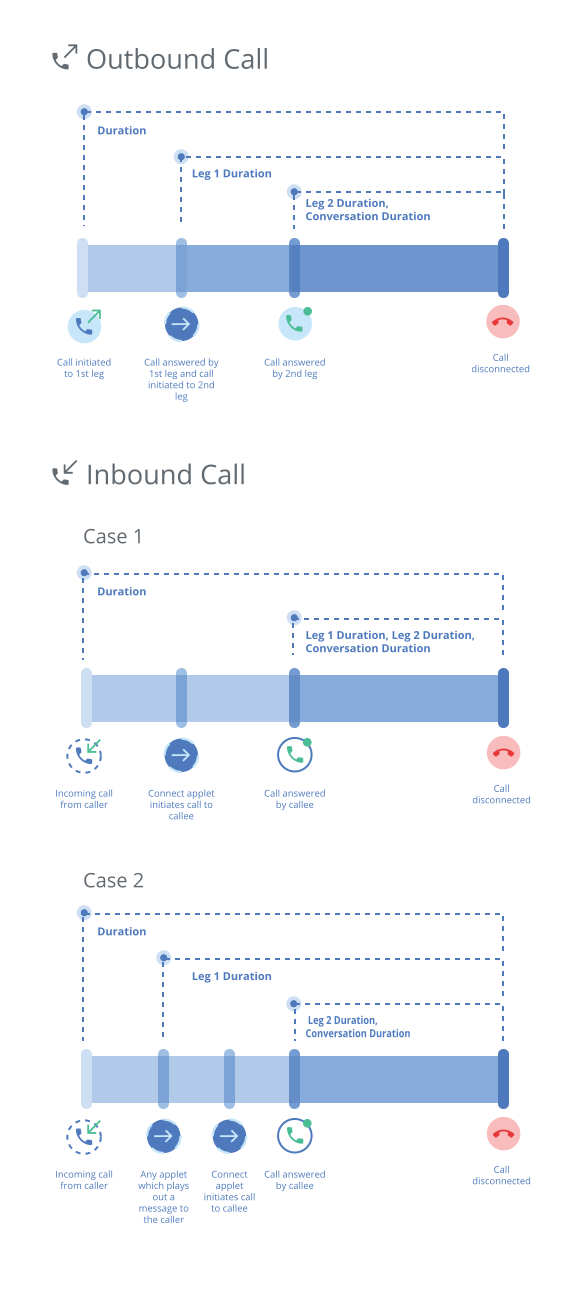
 4
4

